Key Highlights
- Apple has released iOS 26.1 for many iPhone users, with plans to release iOS 26.2 soon.
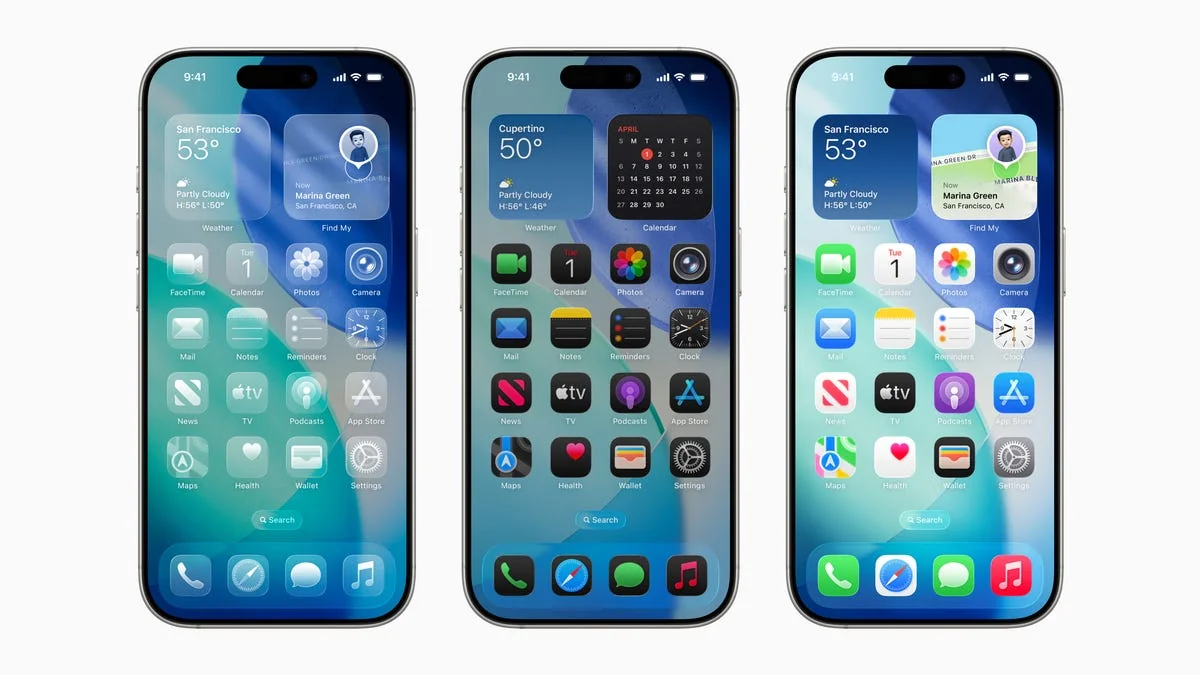
- The latest update brings the liquid glass feature and enhancements in live translation, messages, camera, photos, wallet, CarPlay, and more.
- Around 40% of users have reportedly received the update, though some find it less appealing than expected.
- Users can manually check for updates by going to Settings > General > Software Update on their iPhone.
The Arrival of iOS 26.1: A New Look and Feel for Your iPhone
Apple has finally rolled out its latest software update, iOS 26.1, for a significant portion of iPhone users. This update introduces the highly anticipated Liquid Glass design to both lock screens and home screens, creating a visually striking see-through effect that is sure to draw attention. As the update continues to roll out, it’s clear that Apple aims to enhance user experience with more than just aesthetics.
What’s New in iOS 26.1?
The latest version of the iOS operating system includes a range of new features and improvements. One of the most notable changes is the liquid glass feature, which adds a bubble-like effect to your home screen and lock screen, making them appear more dynamic and modern. Additionally, users will find that live translation has been significantly improved, providing faster and more accurate translations for those who need it on-the-go.
User Reactions: Love It or Hate It?
While some iPhone users are embracing the new design and features, others are less than impressed. On social media platforms like Reddit and X (formerly Twitter), users have been vocal about their opinions. Some have praised the liquid glass feature for its beauty and functionality, while many more express frustration with how it impacts productivity.
“I can’t focus,” one user lamented on Reddit, describing how the new design makes it difficult to concentrate on tasks at hand.
Another user on X expressed similar sentiments, stating that they had automatically updated their phone to iOS 26 and regretted the change, suggesting others avoid downloading the update.
However, not all reactions are negative. Some users have taken to praising the new design, with one person even sharing a photo of their screen, declaring it “beautiful” in a subtle way. This divide in user opinions highlights the subjective nature of technological updates and how they can impact different people differently.
Can You Go Back?
Once users have updated to iOS 26, Apple does not allow them to downgrade to previous versions such as iOS 18. This policy ensures that all users are on the latest software but also means there is a risk associated with updating if one isn’t fully satisfied.
What’s Next for iOS 26.2?
Around the same time, Apple is expected to release another update, iOS 26.2, which will bring new features such as the ability to set alarms for reminders and access lyrics in Apple Music offline. While these details are still under development, they promise even more improvements for iPhone users.
As the tech world waits with bated breath, it’s clear that Apple continues to push boundaries with its iOS updates. Whether you’re a fan of the new design or not, one thing is certain: iOS 26 has arrived, and it’s here to stay.
Kate Perez covers national trends and breaking news for USA TODAY. You can reach her at [email protected] or on Twitter @katecperez_.