Key Highlights
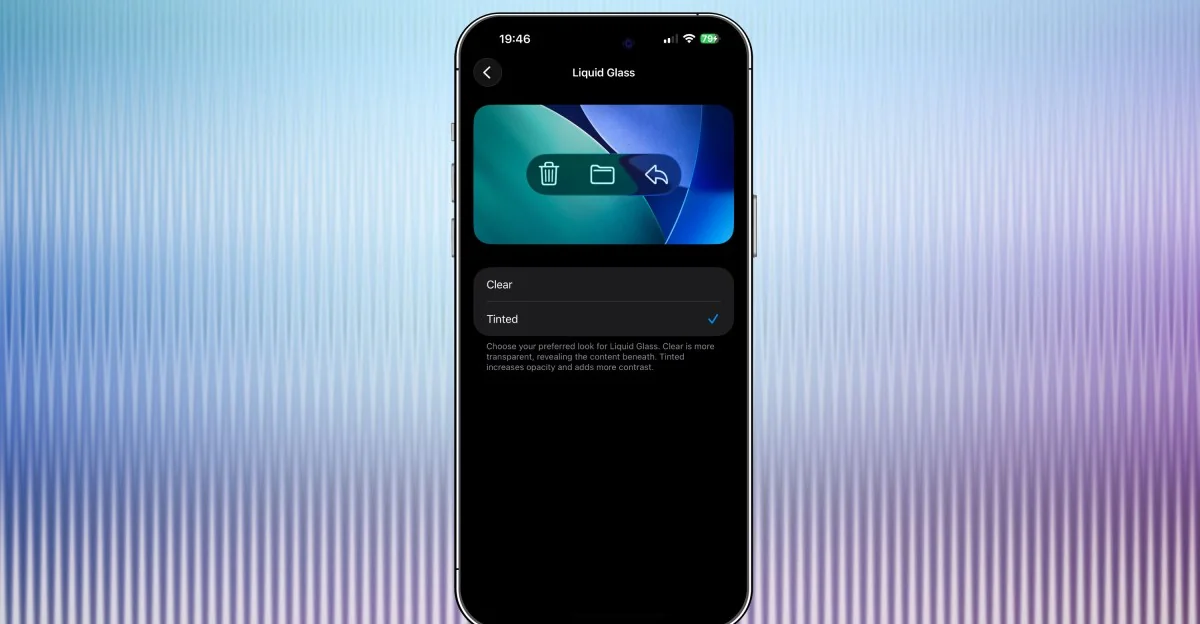
- Apple has released iOS 26.1, which includes a new transparency toggle for Liquid Glass.
- The update addresses legibility issues by allowing users to switch between two Liquid Glass options: the current translucent design and a more frosted look that increases opacity.
- In addition to Liquid Glass tweaks, iOS 26.1 offers enhanced swipe functions for Apple Music and Camera apps, as well as expanded language features.
- Live Translation via connected AirPods is now available for Italian, Chinese (Mandarin, simplified and traditional), Japanese, and Korean.
New Transparency Toggle for Liquid Glass in iOS 26.1
Apple has introduced a significant update to its mobile operating system with the release of iOS 26.1. This version includes a new transparency toggle for the Liquid Glass feature, which was first rolled out as part of the iOS 26 redesign. The toggle allows iPhone users to choose between two options: the default clear design or a more opaque and frosted look that increases opacity and contrast.
Addressing Legibility Issues
The introduction of this transparency toggle is aimed at addressing some of the legibility issues that were observed with the original Liquid Glass design. By offering users the ability to adjust the level of transparency, Apple aims to strike a balance between maintaining the modern aesthetic appeal and ensuring usability. According to Jess Weatherbed from The Verge, “The new transparency option provides more control over how navigational elements appear on the screen, making them easier to read and interact with.”
Enhancements in Other Apps
In addition to the Liquid Glass improvements, iOS 26.1 brings several enhancements to other apps within the ecosystem. Users can now turn off the swipe action that opens the Camera app from the lock screen by navigating to Settings > Camera > Lock Screen Swipe to Open Camera. This change helps prevent accidental photo-taking on locked devices.
Apple Music has also received a mini-player swipe gesture update, allowing users to quickly jump between tracks or listen to previous songs.
Simply swiping forward or backward on the mini player at the bottom of the screen will take you through your album or playlist. Furthermore, Live Translation via connected AirPods is now supported for Italian, Chinese (Mandarin, simplified and traditional), Japanese, and Korean languages.
Comprehensive Update Details
The iOS 26.1 update also includes a range of other improvements and bug fixes across the platform. For instance, Apple Music’s AutoMix feature now supports playback over AirPlay, while the gain control for external USB microphones has been expanded to enable local capture recording. Users can now manually log workouts directly from the Fitness app, and FaceTime audio quality has seen an improvement in low-bandwidth conditions.
Additionally, communication safety and web content filters are enabled by default on existing child accounts aged 13-17 (with variations depending on country or region).
These updates reflect Apple’s ongoing commitment to user privacy and security across its devices and services. The release of iOS 26.1 also marks the simultaneous rollout of updates for iPadOS, macOS Tahoe, watchOS, visionOS, and tvOS versions 26.1.